
Dues Tracker
Membership dues and fees: who has paid and who hasn't, partial payments and late fees, reminders, and a link where each member sees their balance
- 👥 Groups & events
- Send it to people
- Version 1
- Free · no account
What it does
- Who has paid, partial payments, late fees and family discounts
- A link where each member sees their balance and your pay links
- Reminders from your own phone, and a treasurer's report
The people you send its link to open it in any browser, with nothing to install and no account. What they send comes back sealed, so only you can read it.
How to start
- Open Studio on your phone, on the web or on your computer, and tap Gallery (or the Find an App tile).
- Find Dues Tracker under Groups & events, and tap Add.
Try it with example data (in your browser, nothing is kept) · Open it in Studio on the web
Using it needs no AI. New to Studio? Get started.
Main tasks
Add your members
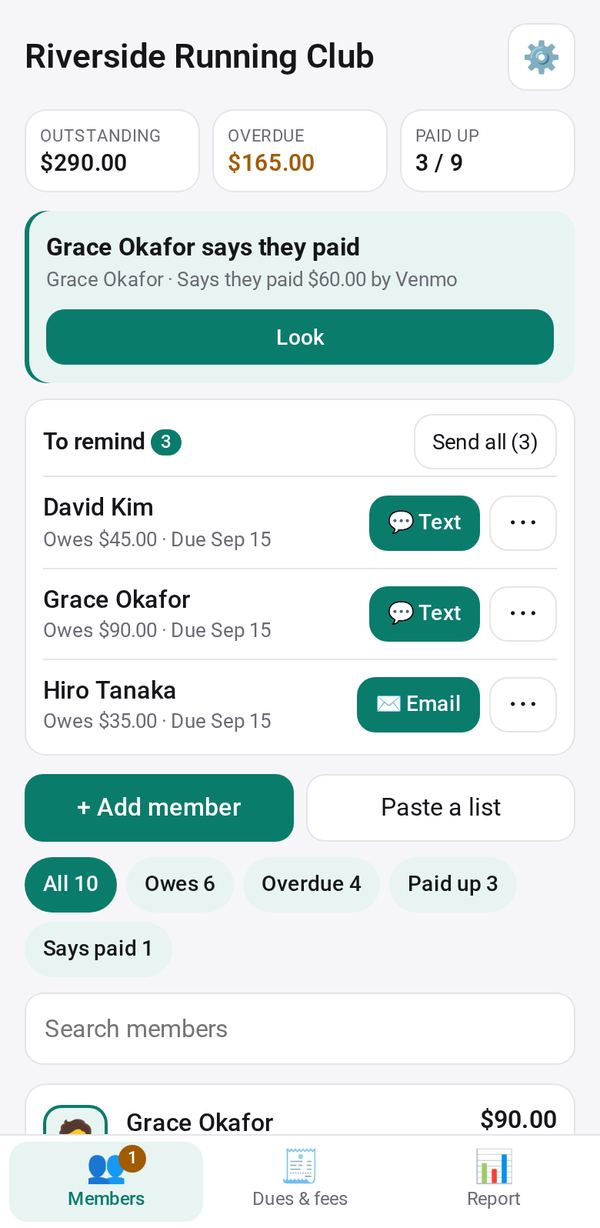
Tap to add a member with their name, type (adult, student, senior, family or honorary), household, phone or email. Paste a list adds many at once.
Set the dues and start a period
Set each member type's dues and the period (year, season, quarter or month). On Dues & fees, tap New dues period to charge every active member, or add a one-off fee for everyone or chosen members.
Record a payment
Open a member and tap Record payment with the amount, date, method and what it is for. Partial payments, late fees and credit are worked out for you.
Send each member their link
Open a member and make their Member link. They see their balance and your pay links, and can tap I've paid; you then Confirm paid or say Not received.
Remind who owes
On the Members tab, To remind lists the members who owe, with a message ready to text, WhatsApp or email from your own phone.
See the treasurer's report
On the Report tab, choose this period, this year, last year or all: what was collected, billed and is still owed, by member type and payment method. Export CSV or print it.
Make it yours
Ask Studio: “Give students a lower rate”
Hold the app and tap Edit with AI, then say what to change in plain words. Every version is kept in History. How to ask well.
In these ready-made spaces
- 🤝 Clubs & groups (Groups and work)
- 🎓 Class & alumni (Groups and work)