
Docs › Studio › Studio on your computer
Fix Studio and getting things back
Every change in Studio can be taken back, and when something in Studio itself goes wrong, its AI finds the cause and repairs it, keeping a copy of each change.
Nothing is lost by a mistake
- An app's change. ↶ Undo, or ⋯ → History → Restore an earlier version.
- A space's arrangement. ↶ in the space's Build undoes the AI's last change to the space.
- A deleted app. Recently deleted under the space's tiles. Bring back restores it with what it saved.
- A removed Gallery app. Same place: it went to Recently deleted with its data.
- An earlier conversation. 🕘 Earlier chats in Build. A removed chat can be brought back for 7 days.
- Everything. A backup file, or your Google Drive copy.
Fix Studio
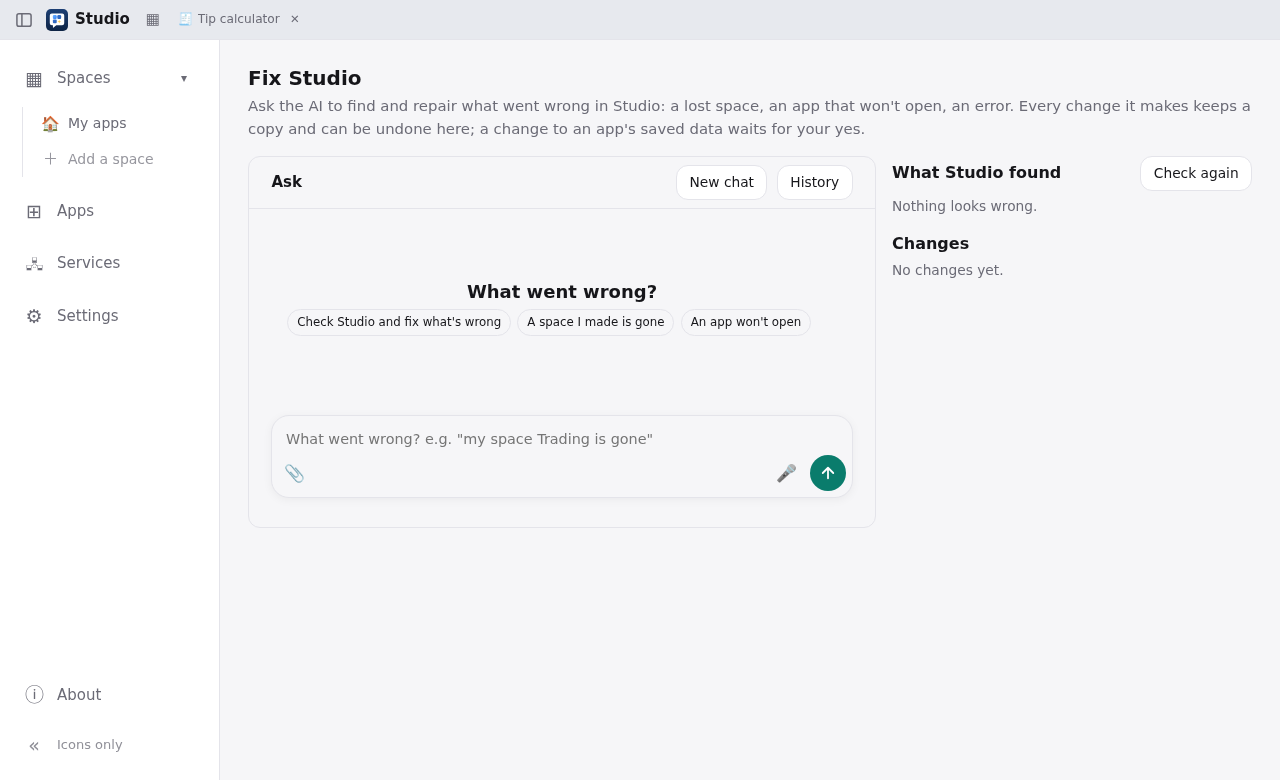
When something in Studio itself goes wrong (a space has gone, an app won't open, an error you don't understand), open Fix Studio:
- from Settings → Open Fix Studio;
- from the notice on the Apps page when Studio finds a problem.
The page has three parts:
- Ask. Say what went wrong, or press Check Studio and fix what's wrong.
- What Studio found. Problems Studio noticed by itself, each with Ask to fix. For an app's own errors there is also Fix it in the app's Build.
- Changes. Every change Fix Studio made, each with Undo. A change to an app's saved data waits for Approve or Decline.
When a service or an app reports trouble
- A service in trouble: its card offers Ask the AI to fix this.
- An app that reported errors while it ran: a line above it offers Ask the AI to fix this. That puts the log into Build's box.