
Homework Planner
Your classes, homework, tests and projects with due dates and reminders, and your grades with a weighted average
- 📚 Learning & people
- Just for you
- Version 1
- Free · no account
What it does
- Classes, homework, tests and projects with due dates and reminders
- Today and This week at a glance; projects in steps
- Grades with a weighted average per class, and a summary to send a parent
How to start
- Open Studio on your phone, on the web or on your computer, and tap Gallery (or the Find an App tile).
- Find Homework Planner under Learning & people, and tap Add.
Try it with example data (in your browser, nothing is kept) · Open it in Studio on the web
Using it needs no AI. New to Studio? Get started.
Main tasks
Add your classes
On the Classes tab, add each class with its color, teacher, room and the days and times it meets.
Add homework quickly
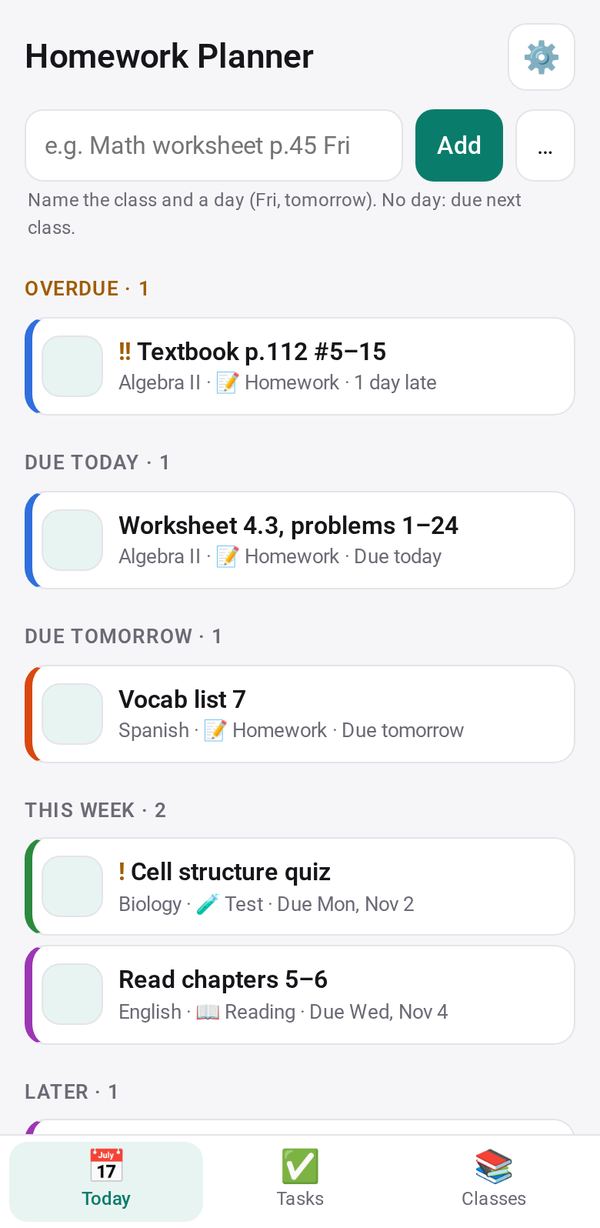
Type a line such as "Math worksheet tomorrow" or "History test Friday" in the quick add box on the Today tab. The class, day and kind are read from it; with no day it is due at the class's next meeting.
Plan the day and the week
The Today tab shows today's classes, then what is Overdue, due Today, Tomorrow, This week and Later. Tick a task done, and Undo if you need to.
Break a project into steps
Open a task and add its steps; tick each one as you go. Turn on a reminder to be told in the days before it is due.
Track your grades
Open a class and tap + Add grade. Studio works out the average per category and the class average with its letter, using the class's weights.
Send a summary to a parent
Tap Share for a parent to send what is overdue, what is due this week and each class's average.
Make it yours
Ask Studio: “Add a column for which teacher set it”
Hold the app and tap Edit with AI, then say what to change in plain words. Every version is kept in History. How to ask well.
In these ready-made spaces
- 🎒 Parents & school (You and your family)
- ✏️ Student (You and your family)