
My Page
Your own homepage at name.palmtop.page: photo, a line about you, your links, contact buttons and a few photos, in a look you pick
- 📚 Learning & people
- Just for you
- Version 1
- Free · no account
What it does
- Your own one-page homepage at name.palmtop.page, free
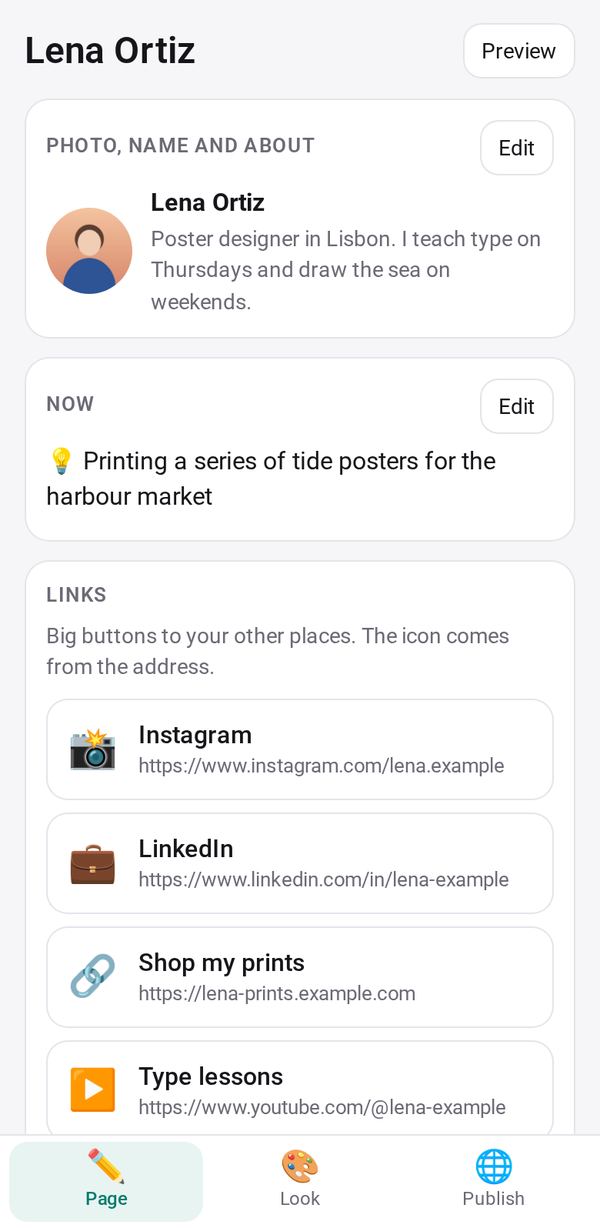
- Your photo, a line about you, your links, and buttons to email, call or WhatsApp you
- Four looks, or the style of a picture or website you like; out of search unless you say so
How to start
- Open Studio on your phone, on the web or on your computer, and tap Gallery (or the Find an App tile).
- Find My Page under Learning & people, and tap Add.
Try it with example data (in your browser, nothing is kept) · Open it in Studio on the web
Using it needs no AI. New to Studio? Get started.
Main tasks
Start your page
Use my business profile fills in what you already wrote, or type your name, one line about you, your main link and your email.
Add your links and contact buttons
On the Page tab, add your links; each gets the right icon for its site. Turn on the buttons to email, call, text or WhatsApp you, and add up to six photos.
Choose a look
On the Look tab, pick one of four looks, an accent color and a font, or take the style from a picture or a website you like and choose between three versions.
Pick your address and publish
On the Publish tab, choose a name for name.palmtop.page; Studio checks it is free as you type. Tap Publish. Your page stays out of search engines unless you tick the box to list it.
Share your page
Copy the address, open it, or show its QR code. When you change something, tap Update to put the changes on the public page.
Make it yours
Ask Studio: “Add a section for my upcoming talks”
Hold the app and tap Edit with AI, then say what to change in plain words. Every version is kept in History. How to ask well.
In these ready-made spaces
- 🌱 Personal starter (You and your family)
- 🎨 Hobbies (You and your family)
- 🔎 Job search (Groups and work)